

Configure Platform Settings
Once ReadyLaunch is enabled, your community needs rules and structure. Platform settings define how members interact, what they can post, how profiles look, whether groups are enabled, how media is shared, and what moderation tools are in place. Configuring these ensures your community runs smoothly and aligns with your goals.
Steps:
1. Go to the ReadyLaunch > Activation Settings > Platform Settings section.
2. Click the Settings button beside each feature to configure.
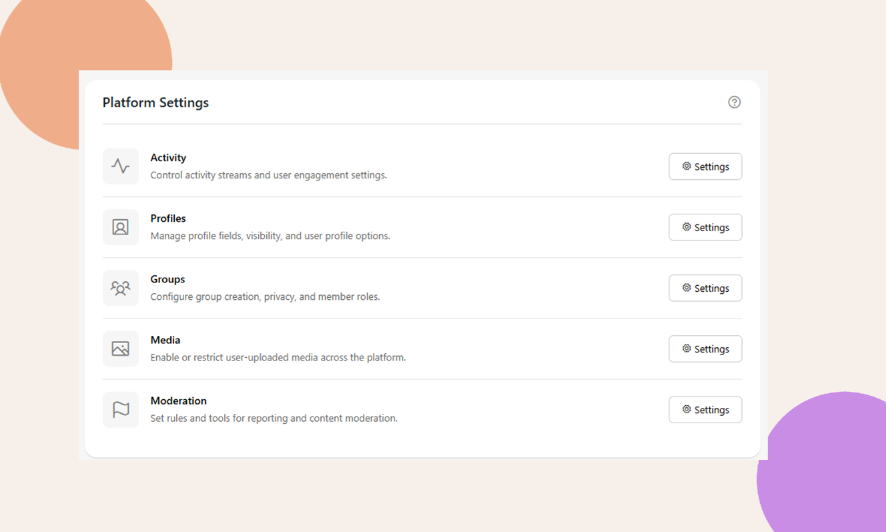
Activity Settings
- Control how posts and comments work in your community.
- Options include: editing posts, pinning, polls, scheduling, following members, link previews, search, filters, and sorting.
- Decide if members can comment, thread replies, or limit visible comments.
- Choose what auto-posts show up (e.g., profile updates, blog posts).
- Control who is allowed to post in the activity feed.
Profiles
- Manage how member profiles look and work.
- Choose display name format and profile URL style.
- Set rules for avatars and cover images (custom or default).
- Customize profile headers (layout, elements, online status).
- Decide how members appear in directories (grid/list, what actions to show).
- Enable profile types for different member groups.
- Allow advanced search in member directories.
Groups
- Manage how user-created groups are set up and displayed.
- Control descriptions, group types, and statuses.
- Customize group interaction and permissions.
Media
- Manage uploads for photos, documents, videos, emojis, and GIFs.
- Set size limits, allowed file types, and number of uploads.
- Control where uploads are allowed (profiles, groups, forums, messages).
- Assign permissions by member role.
- Enable security features like blocking direct access to files.
Moderation
- Tools to manage behavior and keep your community safe.
- Let members block or report others.
- Auto-suspend members after multiple reports.
- Allow content reporting (posts, comments, groups, forums, media).
- Auto-hide reported content after a set number of reports.
- Notify admins via email when reports happen.