Essential Plugins for Your BuddyBoss App
Before you can build or preview your app, you’ll need to install a few key plugins. These plugins power the connection between your WordPress site and your BuddyBoss App.
BuddyBoss App Plugin (Required)
This plugin is the core bridge between your WordPress site and your mobile app. Without it, the app cannot sync your content.
Steps to install:
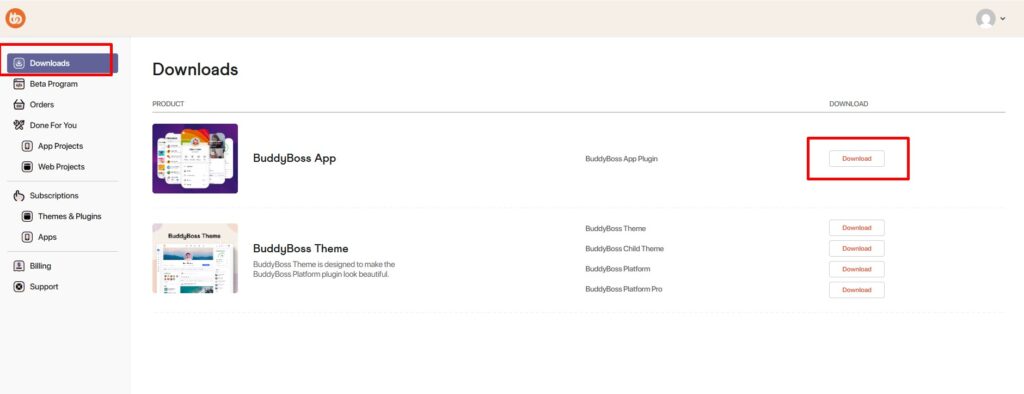
- Log in to your BuddyBoss account and download the BuddyBoss App Plugin .zip file.
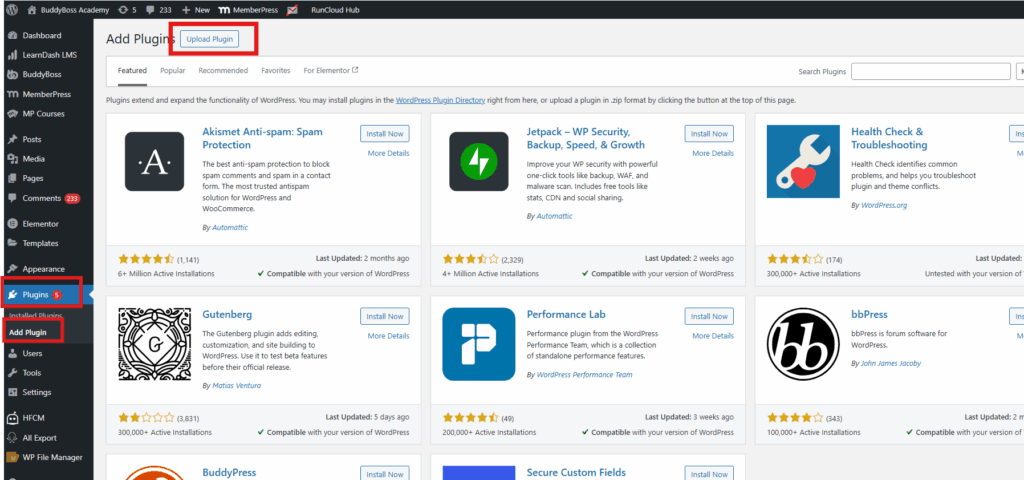
- In your WordPress Dashboard, go to Plugins > Add New.
- Click Upload Plugin and select the .zip file.
- Click Install Now, then Activate.
Once active, your app can sync content in real time from your site.
BuddyBoss Platform Plugin (Optional)
Adds community features such as profiles, messaging, forums, and the activity feed.
Steps:
- In your WordPress Dashboard, go to Plugins > Add New.
- Search for BuddyBoss Platform or upload the .zip from your BuddyBoss account.
- Click Install Now, then Activate.
BuddyBoss Platform Pro Plugin (Optional Premium Add-on)
Enhances the BuddyBoss Platform with premium features, included in certain plans.
Steps:
- Download the plugin from your BuddyBoss account.
- In your WordPress Dashboard, go to Plugins > Add New.
- Upload the .zip file.
- Click Install Now, then Activate.
Reference: